All Posts
Windows Server 2022 73 Views 2 min read

How do I create installation media for Windows Server 2022?

Last Updated March 29, 2026
How do I create installation media for Windows Server 2022

Once you’ve downloaded the installation file (Windows Server 2022 .iso), create a bootable USB drive (pendrive) to perform the installation.

Note: You’ll need a USB device with a minimum memory of 16GB.

The application you can use for this process is:

Rufus

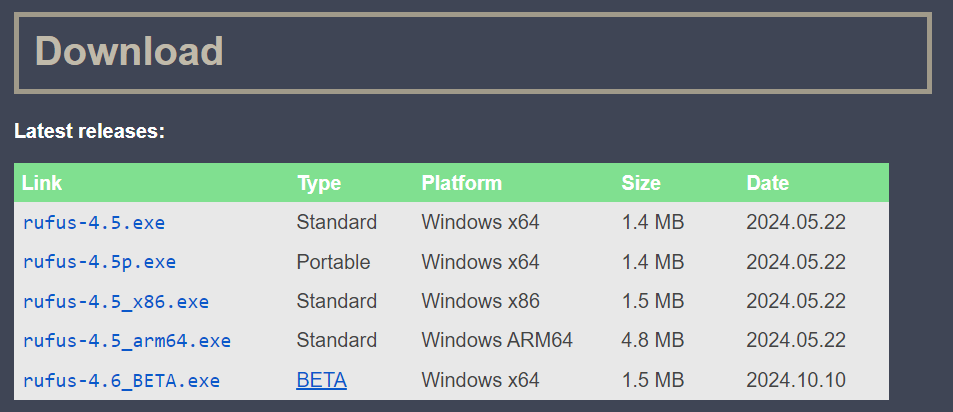
A screenshot showing the Rufus website's download section, indicating which version/link to click to download the latest Rufus executable
  • Connect the USB and then open the Rufus programme
  • Click on Select and find the Windows Server 2022 .iso file you want to set up.
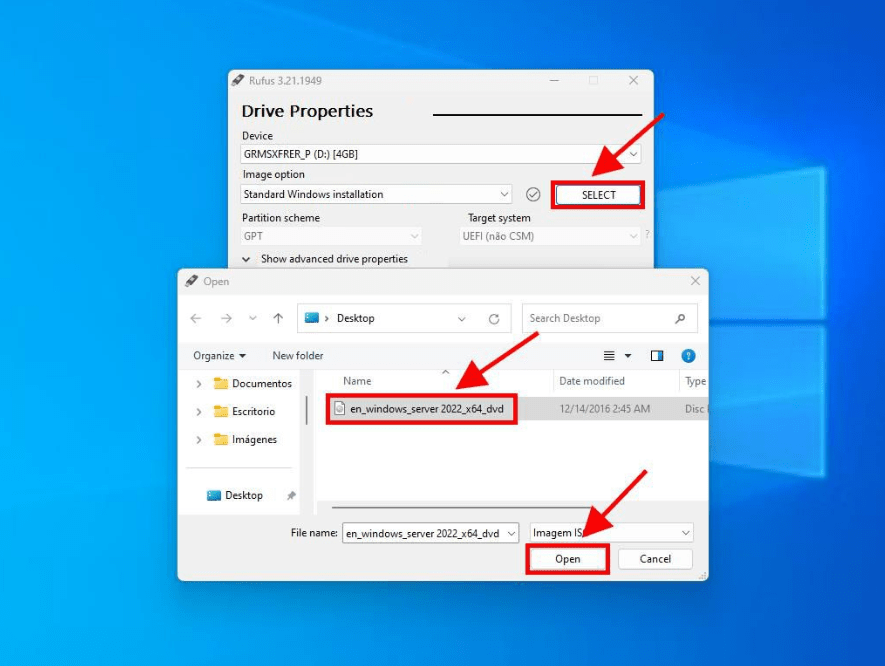
A screenshot of the Rufus program interface showing a connected USB drive selected, the "Select" button being clicked, and the Windows Server 2022 .iso file loaded into the "Boot selection" field
  • Finally, click on Start and wait for the programme to create the bootable USB drive.

Note: It will show a popup window called Customize Windows Installation, select option 3 Disable Data Collection and wait for the program to create the bootable USB drive.
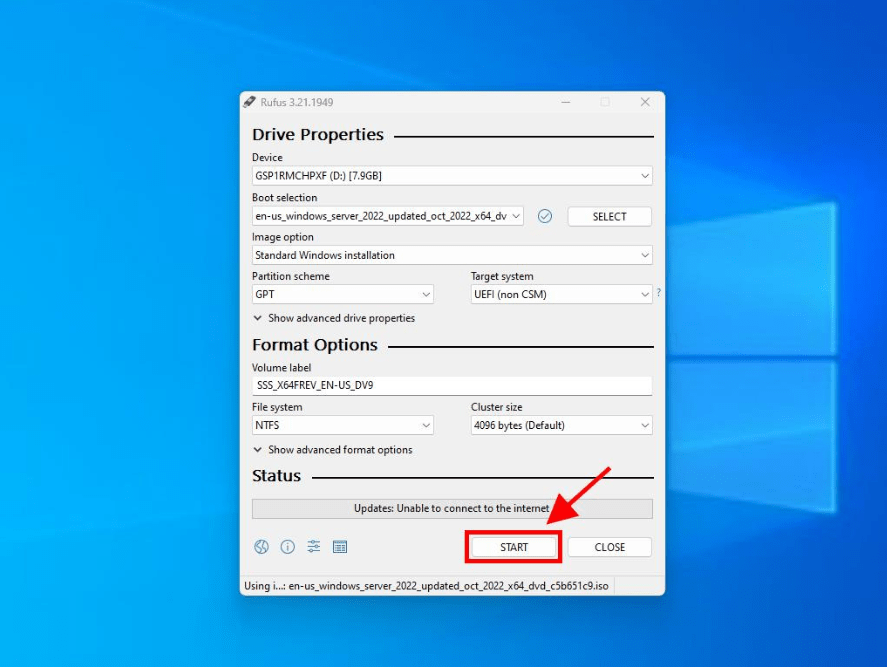
A screenshot showing the "Customize Windows Installation" popup that appears after clicking "Start" in Rufus. It specifically highlights checking the third option, "Disable Data Collection (Skip privacy questions)"
  • Once the setup is complete (Prepared progress bar), click on Close and you’ll be ready to install Windows Server 2022.
A screenshot showing the bottom of the Rufus window with the green "READY" progress bar, indicating that the bootable USB creation process is complete and the user can now click "Close"
Share this article:
Fast-Track Your Compliance

Need help with Aramco CCC Certification?

Get a Free Expert Consultation.
Aramco Kit

Ali Aljubaily

Cybersecurity Consultant

I am Ali Yousef, a certified engineer from Microsoft, holding the Microsoft Certified System Associate certification as well as the CompTIA Network+ certification. I work as the Group IT Manager.

Latest

Explore Our Blog Posts

Discover insightful articles on cybersecurity and more.

Access Control SACS-210 compliance guide for IT Managers TPC1.9 TPC1.12
Aramco Cybersecurity Compliance 9 Views 8 min read

What Is Access Control in SACS-210? An IT Manager’s Guide

Wondering what is access control for SACS-210? Eliminate guesswork and get auditor-ready templates to enforce MFA, RBAC, and secure corporate...
Read more
Aramco Cybersecurity Compliance 27 Views 10 min read

Pass SACS-210 Compliance Using Microsoft Entra ID Plan 1: A Guide for Saudi SMEs

Pass SACS-210 compliance with Microsoft Entra ID Plan 1. A step-by-step identity and access management guide for Saudi SMEs seeking...
Read more
Aramco CCC Certification Guide for Saudi SMEs 2026 SACS-210 (Feb 2026)
Aramco Cybersecurity Compliance 100 Views 11 min read

[Updated] Aramco CCC Certification Guide for Saudi SMEs 2026

Complete guide to Saudi Aramco CCC certification under the new SACS-210 (Feb 2026) standard. Learn the 33 controls, and get...
Read more

Our Certified Expertise and Technology Partnerships

We are certified partners with the world's leading cybersecurity vendors to deliver best-in-class solutions.

Microsoft
Microsoft
Certified Partner
Bitdefender
Bitdefender
Gold Partner
Fortinet
Fortinet
Authorized Partner
Acronis
Acronis
Certified Partner

Ready to Secure Your Business?

Our cybersecurity experts are here to help you achieve compliance and protect your digital assets with our 100% remote implementation model. Achieving compliance requires zero on-site field visits or internal IT hours. Contact us for a free, no-obligation assessment of your cybersecurity needs. We are committed to a 2-hour response time for all inquiries during business hours.

2-hour response time
Free consultation
Certified experts